Odoo 19 AI Features: How to Deploy Your Own Agents
Unlock the full potential of Odoo 19 with our guide to pre-configured AI agents. Learn to set up Ask AI, Livechat, and custom tools to automate your workflow.
Odoo 19 has officially arrived, bringing powerful, pre-configured AI agents to your dashboard while offering the flexibility to build custom solutions tailored to your unique business workflows.
However, unlocking the full potential of these tools requires more than just a few clicks. To see real ROI, you need to understand which AI agents align with your specific goals, how to securely integrate your API keys, and the technical nuances that ensure your system runs smoothly.
At KONA Consulting, we believe you should spend your time growing your business, not troubleshooting software. We have analyzed the Odoo AI ecosystem to provide you with a clear, step-by-step roadmap for a seamless configuration.
The 2 Essential Requirements for Odoo AI Success
Before you begin, ensure you have the following two prerequisites ready:
First, you must have an active Odoo Enterprise licence.
All standard AI functionalities introduced in Odoo 19 are part of the OEEL-1 licence, which is exclusively available to Enterprise users.
Second, you need to secure at least one LLM API key to bridge the gap between Odoo and your preferred artificial intelligence model.
Odoo 19 currently provides native support for the following industry-leading providers:
Experience Seamless Productivity with Odoo 19's Native AI Integration
The groundbreaking AI capabilities in Odoo 19 are intelligently embedded into your daily workflows, adapting dynamically to your specific business tasks and objectives to save you valuable time.
Navigate Smarter with the Global "Ask AI" Assistant
Positioned prominently in the top navigation bar of every screen, this powerful tool serves as your direct gateway to instant, system-wide intelligence.
Simply type your request using natural conversational language, and the assistant will instantly retrieve database records or guide you directly to the exact dashboard you need.

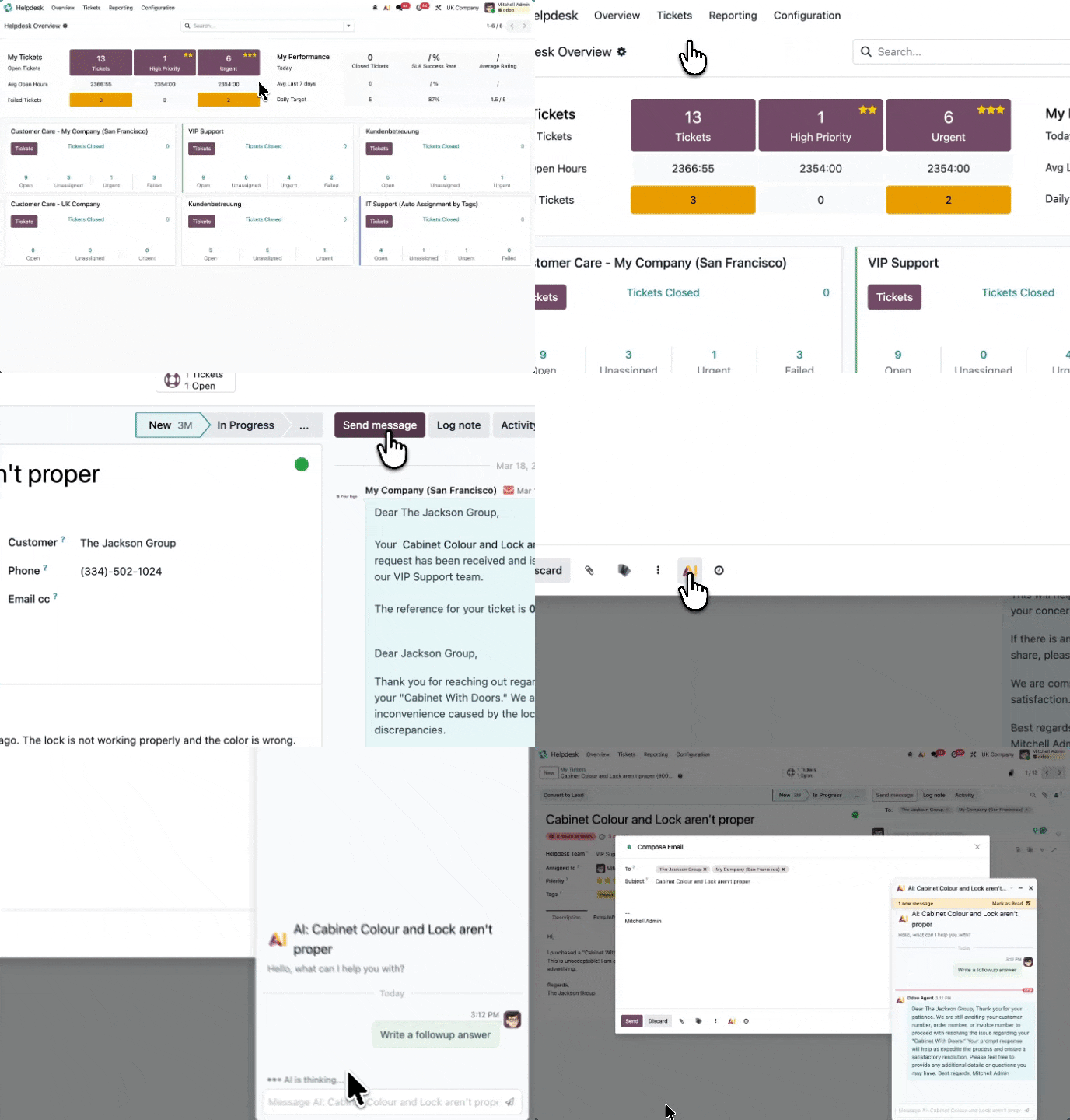
Enhance Collaboration via the Chatter AI Companion
Whether you are reviewing a sales pipeline, resolving a customer support ticket, or updating client details, the integrated AI icon in your communication stream is ready to help. Click it to instantly generate concise conversation summaries, draft professional replies, or extract key background details.
Draft Flawless Emails and Internal Notes in Seconds
Whenever you compose a new client email or document an internal update, the built-in AI writing assistant is there to streamline your communication. Let it draft your messages from scratch, refine your professional tone, or schedule timely follow-ups automatically.
Polished Content with Real-Time Text Optimization
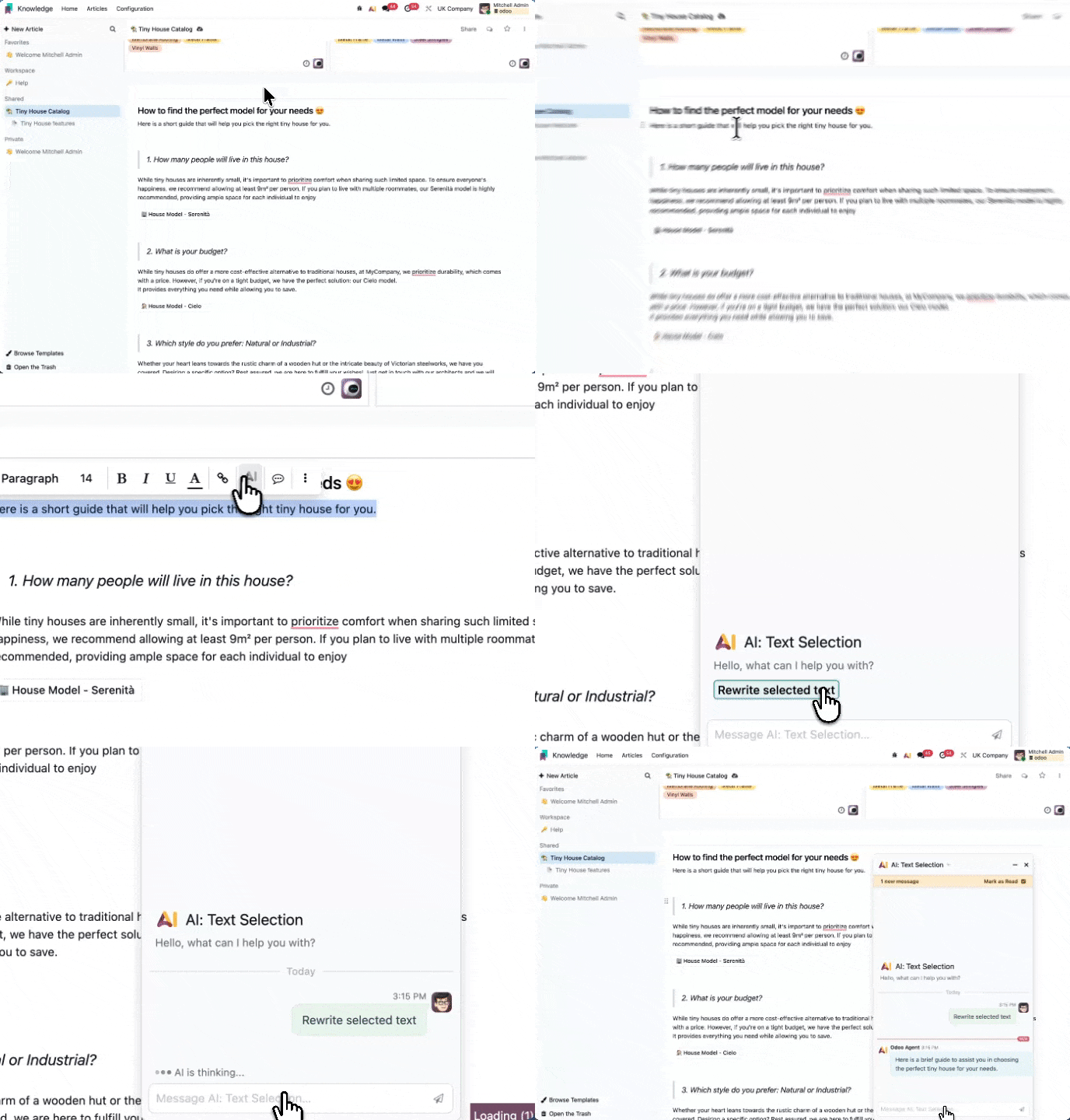
Refining your copy is effortless: just highlight any text within your project descriptions, internal logs, or shared Knowledge bases. The inline AI editor instantly appears to help you rewrite, condense, or adapt your messaging style on the fly.
The AI Assistant Hub
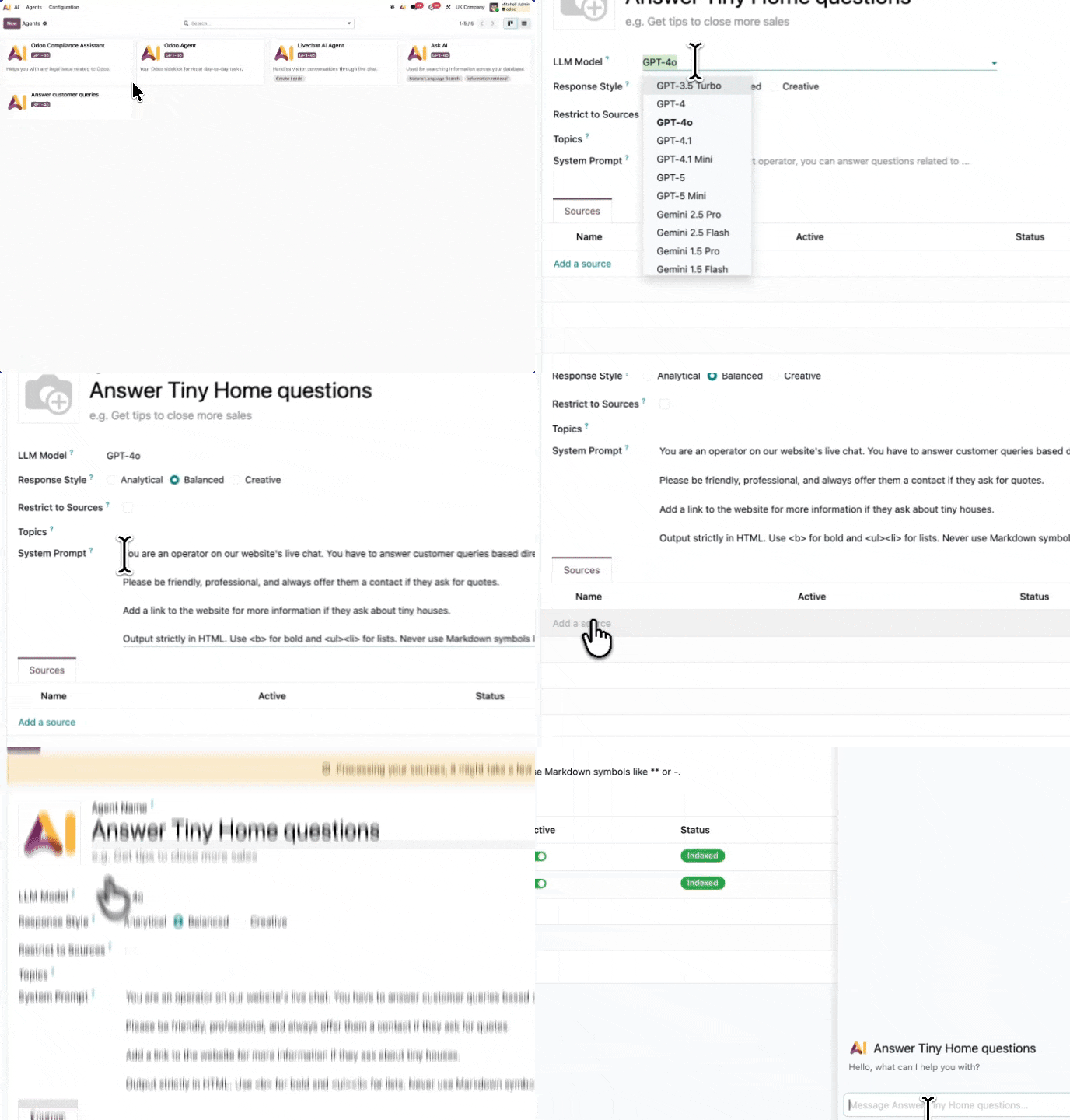
Located directly within your Odoo dashboard, this centralized command center allows your team to discover available AI agents, engage in real-time problem solving, and build custom automation workflows tailored to your operational needs.
Intelligent Live Chat
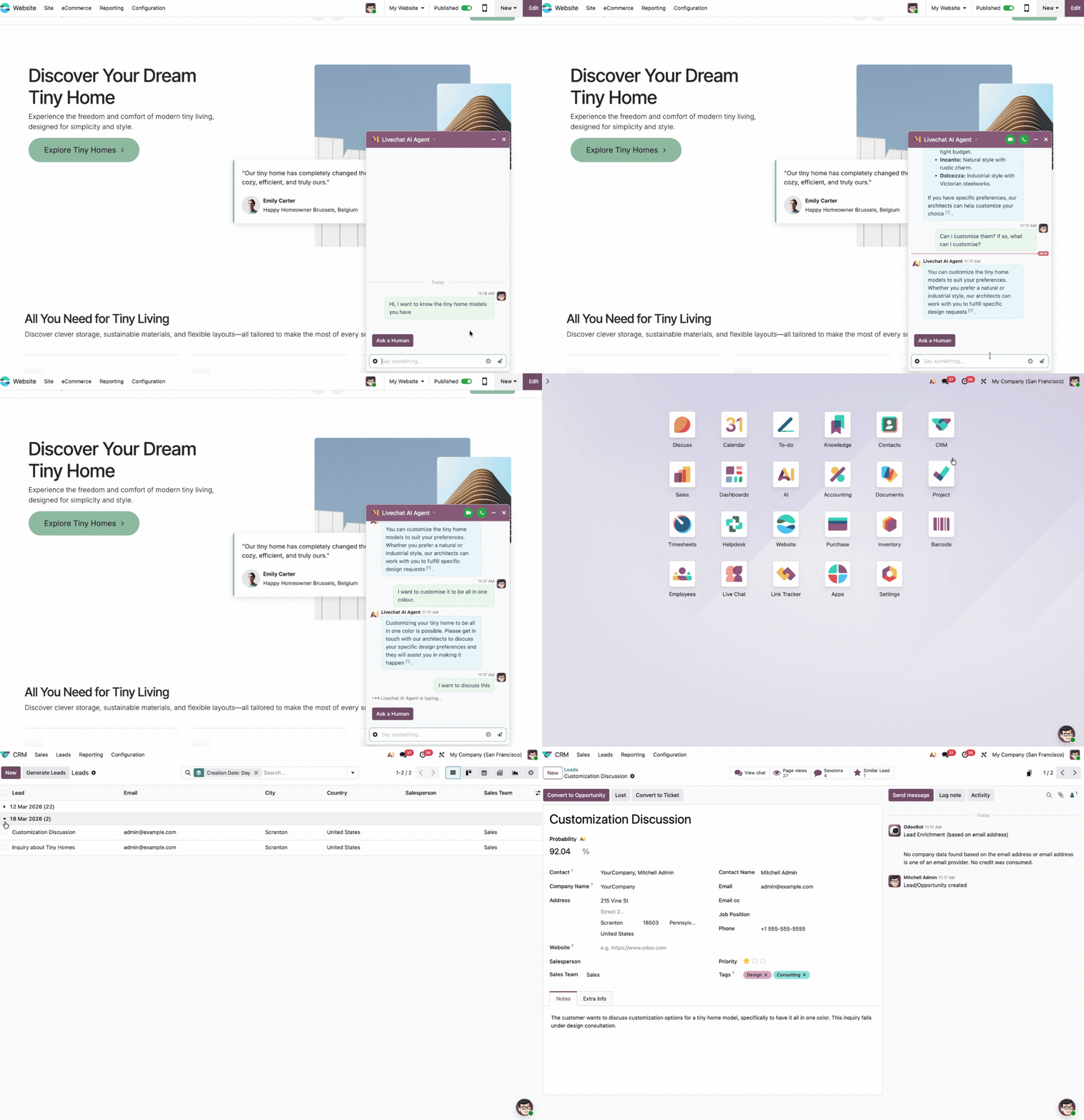
Transform your customer experience by deploying AI agents on your website. These smart assistants manage initial visitor inquiries instantly, ensuring seamless transitions to your human support team only when complex human judgment is required.
Unlock efficiency with 7 native AI agents in Odoo 19
Odoo 19 introduces seven powerful, pre-configured AI agents designed to streamline your business processes. At KONA Consulting, we help you leverage these tools to reclaim your time and focus on scaling your business.
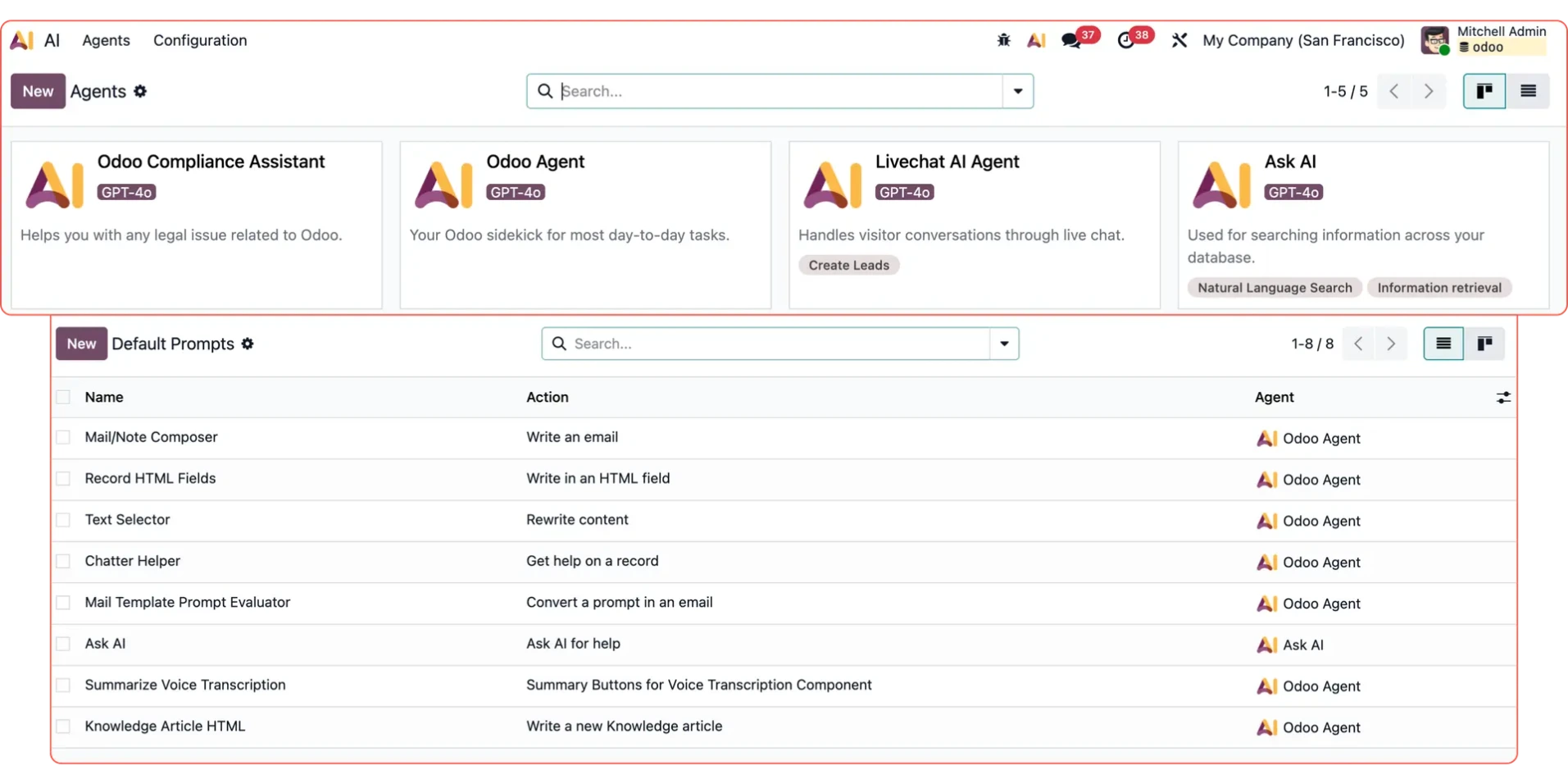
Odoo Agent
Integrated into: Chatter AI, email management, record descriptions, content refinement, and voice-to-text summaries.
Think of this as your versatile digital co-pilot. It handles the heavy lifting of drafting professional emails, summarizing lengthy threads, and polishing internal documentation. By uploading your company’s specific knowledge base, you can train this agent to provide responses that reflect your brand’s unique voice and operational standards.
Technical Specifications
- Core Model: gpt-4o
- Communication Style: Balanced and Professional
- Agent Status: Core System Component (Permanent)
Ask AI
Integrated into: The global navigation bar, accessible from any screen.
Ask AI acts as your instant business intelligence dashboard. Whether you need to pull a quick report on open sales orders or analyze customer trends, this tool interprets natural language queries and navigates directly to the data you need. With 15 pre-set prompts for inventory, cash flow, and more, you get actionable insights in seconds.
Technical Specifications
- Core Model: gemini-2.5-flash (Optimized)
- Communication Style: Data-Driven and Analytical
- Agent Status: Core System Component
Expert Insight: Our Ask AI feature leverages the high-performance gemini-2.5-flash model to deliver lightning-fast responses at scale. It utilizes a dual-engine architecture: Information Retrieval for precise, factual answers and Natural Language Search for intuitive site navigation.
Intelligent Live Chat Agent
Integrated within: Your website’s live chat interface.
Transform your customer experience with an automated operator that works around the clock. This agent provides professional, concise, and multilingual support that mirrors your brand voice. When a complex issue arises, it seamlessly captures visitor contact information to nurture new business opportunities. We’ve implemented strict communication guardrails, ensuring the agent uses natural, human-friendly language while keeping internal system terminology hidden from your customers.
Technical Specifications
- Core Engine: gpt-4o
- Communication Tone: Analytical and precise
- Deployment: Pre-configured with full customization options.
Automated Web Page Generator
Integrated within: Your website builder’s page creation workflow.
Stop staring at blank screens and let KONA Consulting’s AI tools handle the heavy lifting. Simply define your page objective and select your preferred tone; our agent instantly generates high-converting, relevant copy directly into your layout. Operating silently in the background, this tool accelerates your content production without the need for a clunky chat interface.
Technical Specifications
- Core Engine: gpt-4.1
- Classification: System-level agent
- Availability: Optional; disabled by default.
Smart Call Summarizer
Integrated within: Your VoIP call management dashboard.
Reclaim your time by automating post-call administration. Our summarizer distills lengthy conversations into actionable, concise insights of under 10 words. By automatically detecting the language and logging summaries the moment a call concludes, this tool ensures your team stays organized and efficient—provided your VoIP AI integration is enabled.
Technical Specifications
- Core Engine: Configurable to your preferred LLM
- Classification: System-level agent
- Availability: Optional; disabled by default.
Odoo Compliance Assistant
Integrated within: The AI application configuration settings.
By leveraging the Odoo Enterprise Agreement, this intelligent assistant delivers precise, verified insights into complex licensing requirements. It serves as a foundational blueprint within our demo environment, illustrating exactly how businesses can deploy document-centric AI agents to streamline compliance and governance workflows.
Technical Specifications
- Core Engine: gpt-4o
- Output Profile: Analytical & Precise
- Deployment: Internal Demo Reference
Custom Odoo AI Agents
Integrated via: The Odoo AI module.
Beyond standard tools, KONA Consulting helps you architect bespoke AI agents tailored to your unique operational needs. These agents utilize the same robust infrastructure as system-level tools, ensuring seamless access to your data sources and fields. Unlike static configurations, these agents are fully customizable, empowering you to adapt, refine, or scale your automation as your business evolves.
How to Master Odoo AI Agents
At KONA Consulting, we believe your software should work for you, not the other way around. Below, we outline how to maximize your productivity using Odoo’s native AI capabilities and how to deploy your own custom solutions across three key areas:
- Leveraging the Ask AI Assistant
- Integrating AI directly into your business records
- Developing custom AI Agents for specialized tasks.
1. Leveraging the Ask AI Assistant
Ask AI is your primary gateway to instant business intelligence, designed to provide immediate answers without navigating through complex menu structures.
To get started, simply click the Ask AI button located in the top-right corner of your Odoo dashboard to launch the interactive chat interface. You can input natural language queries or utilize our pre-configured quick-prompt buttons. These shortcuts are optimized for common administrative tasks, such as identifying top-performing sales leads, reviewing recent activity logs, checking real-time inventory levels, or managing your daily schedule.
The agent is engineered to intelligently determine whether to provide a concise text-based summary or to navigate directly to the relevant data visualization. For instance:
- Querying "Who are my top customers?" generates a clear, summarized report.
- Requesting "Show me my top customers" instantly renders a pivot table or filtered list view, saving you valuable time.
Pro tips for maximizing AI performance:
- Navigate vs. Query: Use the command "show" to instantly jump to a specific dashboard or screen. Use "who", "how many", or "what" when you need precise, data-driven business intelligence.
- Iterative Refinement: If your initial report needs a tweak, simply provide a follow-up instruction. Commands like "Group that by month instead" or "Filter to just this quarter" work instantly. KONA Consulting knows that Ask AI maintains full conversational context to deliver the exact view you need.
- Data Integrity: Ask AI pulls directly from your live Odoo database, ensuring 100% accuracy. It never hallucinates or estimates figures; if the data isn't available, it will provide a transparent notification so you always maintain full control over your business insights.
2. Leveraging AI Within Your Business Records
Every record in Odoo features native AI integration within the compose and chatter modules. Here is how you can use these tools to streamline your daily operations:
The Chatter AI Advantage
Access the AI button directly within any record's message thread to accelerate your workflow:
- Instantly generate summaries of lengthy conversation histories (e.g., "What is the current status of this project?")
- Compose professional replies that perfectly mirror the tone and style of previous correspondence
- Extract specific record details effortlessly (e.g., "When was this last updated?").
Intelligent Email Drafting
Stop wasting time staring at a blank screen. When you compose emails directly from a record, our integrated AI assistant handles the heavy lifting. Simply provide a brief summary of your intent, and watch as the tool generates a polished, professional draft—complete with appropriate greetings—that perfectly mirrors the tone of your existing email thread.
Mastering inline text refinement
Elevate your writing instantly by highlighting any text within internal notes, description fields, or Knowledge base articles. A streamlined menu will appear, giving you the power to rewrite, condense, expand, or refine your tone with a single click. Your content is replaced in seconds with a clearer, more impactful version.
Optimizing rich-text fields
Whether you are crafting detailed product descriptions, outlining project tasks, or documenting sales opportunities, look for the AI button within your rich-text fields. It is designed to help you brainstorm, draft, and expand professional content without ever leaving the page.
3. Building your custom AI Agent
At KONA Consulting, we believe you shouldn't need a degree in computer science to automate your workflow. You can build a high-performing, custom AI agent in minutes—no technical expertise required.
Step 1: Define your agent's identity
Head over to AI → Agents → New. Upload a professional profile image and assign your agent a clear name and purpose. Since this avatar will appear in your team's chatter threads, choose an icon that is easily identifiable. A concise description ensures your team knows exactly how to leverage the agent for maximum productivity.
Step 2: Select your model and tone
Your choice of AI model determines the intelligence behind your agent. We recommend the default gpt-4o, as it delivers exceptional results for most business workflows. Next, select a response style to align the agent’s writing with your company voice:
- Analytical: Delivers concise, data-driven insights. Perfect for technical support, internal documentation, and factual reporting.
- Balanced: Our recommended setting for general business communication, offering a professional blend of clarity and warmth.
- Creative: Encourages more expressive, engaging language. Best suited for marketing copy, brainstorming sessions, and creative drafting.
Step 3: Define your operational instructions
This is where you transform your agent into a true business asset. Use plain, conversational language to define the agent's role, its specific responsibilities, and its behavioral guidelines. To help you get started, here are a few proven examples of effective system prompts:
"You act as a specialized procurement assistant for our purchasing department. Your role is to assist staff with inventory monitoring, clarifying supplier agreements, and drafting professional purchase inquiries. Should a query fall outside the scope of procurement operations, kindly inform the user that your expertise is strictly limited to purchasing matters."
"You are a dedicated onboarding mentor for new hires at Acme Corp. Your mission is to help new team members decode company policies, connect with the correct departments, and navigate their first week with ease. Maintain a tone that is welcoming, motivating, and helpful."
"You serve as a technical product expert for our entire catalog. Every response must include the relevant product code to ensure accuracy. If you are uncertain about a specific detail, state that clearly—never speculate or provide unverified information."
Step 4: Upload your knowledge base
Navigate to the Sources tab to upload the essential documentation your agent needs to master. The system seamlessly integrates PDFs, Word documents, live URLs, Knowledge articles, and assets directly from your Documents app.
Each upload undergoes a quick indexing phase. Monitor the status as it shifts from Processing to Indexed. Once the system is fully indexed, your agent is ready to provide precise, cited answers based directly on your proprietary data.
- Scale your intelligence without restrictions; there is no cap on the number of sources you can integrate.
- Keep your information current by reprocessing outdated files with a single click at any time.
- To ensure strict adherence to your internal data and prevent hallucinations, enable the "Only answer from my sources" setting.
Step 5: Validate performance before deployment
Before launching, always utilize the Test button located at the top of the interface. This initiates a secure, private environment where you can audit the agent’s logic. Challenge the agent with known data points, then test its boundaries by asking off-topic questions to confirm it handles limitations correctly. If your organization operates globally, verify its performance in multiple languages. Once you are confident in its accuracy, share the access link with your team or coordinate with your administrator to embed it directly into your Odoo workspace.
5 expert strategies for maximizing Odoo AI efficiency
1. Define your brand voice with a custom system prompt
The standard Odoo Agent prompt is a blank canvas. At KONA Consulting, we recommend prioritizing a tailored system prompt that aligns the AI’s personality, terminology, and operational context with your unique business identity.
2. Master the art of precise prompting
High-quality input drives high-quality output. While a generic request like "Show me sales this month" provides basic data, a refined prompt such as "Show me a bar chart of sales by salesperson this month, sorted by highest first" delivers the actionable insights your leadership team needs to make informed decisions.
3. Master the art of concise prompting
An AI agent performs at its peak when guided by five sharp, actionable instructions rather than being stifled by pages of complex edge cases. At KONA Consulting, we recommend prioritizing the most frequent user scenarios to ensure your automation delivers immediate, high-quality results.
4. Curate your knowledge base for maximum impact
Feeding your AI a single, meticulously updated knowledge article is far more effective than forcing it to parse a 200-page legacy document riddled with obsolete policies. We help you streamline your data strategy because, in the world of AI, precision and relevance will always outperform sheer volume.
5. Enforce strict boundaries for sensitive data
When handling HR protocols, legal compliance, or proprietary contracts, activating the "Only answer from my sources" setting is non-negotiable. This safeguard prevents your agent from hallucinating or defaulting to generic internet data, keeping your internal operations secure and perfectly aligned with your company’s unique standards.